Tunarus - Google Slide Template
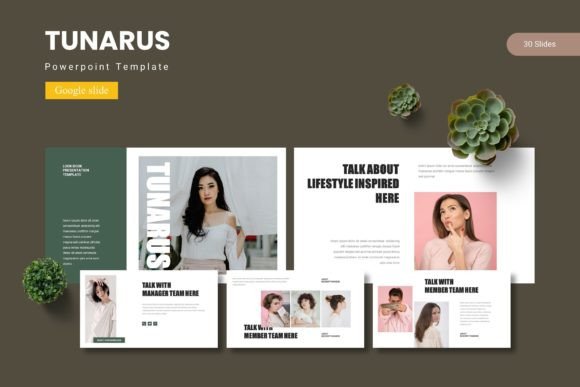
Imagine transforming a standard presentation into a visually compelling narrative that captivates your audience from the first slide. With the right design assets, you can achieve this effortlessly, and the Tunarus - Google Slide Template is built to do just that. This collection of premium design assets offers a robust framework for anyone looking to create polished, professional presentations without starting from a blank canvas.
At its core, this template provides over 150 total slides, organized into five premade color schemes with 30 slides each. This structure gives you immense flexibility, allowing you to mix and match layouts to fit the specific flow of your content. Whether you're building a business proposal, a creative portfolio, or an educational module, the variety ensures your presentation feels fresh and tailored. The inclusion of section break slides helps organize complex information into digestible chunks, improving the overall narrative structure.
Practical Features for Seamless Design
What makes this template particularly useful is its focus on practical design elements. The handcrafted infographics and pixel-perfect illustrations are not just decorative; they serve as functional tools to visualize data and concepts clearly. Since everything is based on master slides, making global changes to fonts or colors is streamlined, saving you significant time during the editing process. The picture placeholders are designed for drag-and-drop efficiency, making it simple to integrate your own images and maintain visual consistency.
For designers and creators, the value extends beyond the immediate project. The Tunarus - Google Slide Template can be a foundational asset in a broader design toolkit. Its clean, modern aesthetic makes it suitable for a range of applications:
- Brand Presentations: Use the consistent color schemes and professional layouts to pitch to clients or present brand guidelines, reinforcing a strong brand identity.
- Educational & Training Materials: Create engaging workshops or course materials with clear infographics and structured sections that facilitate learning.
- Portfolio Showcases: The gallery and portfolio slides are ideal for photographers, architects, or designers to display their work in an elegant, organized manner.
- Internal Reports & Pitch Decks: Elevate quarterly reports or startup pitches with a design that looks custom-made, helping to build trust and professionalism.
Tips for Choosing and Using Presentation Templates
When selecting a template like this, consider how its design language aligns with your project's mood. The premade color variations offer a starting point, but ensure the overall tone—whether it's corporate, creative, or minimalist—matches your message. Always test the template with your own content early on. Check the readability of text on the chosen backgrounds and see if the layout hierarchy guides the viewer's eye as intended.
Another key aspect is font pairing. While the template includes its own typography, understanding how to pair typefaces is crucial for any design project. You might consider pairing a clean sans-serif font from the template with a complementary serif or script font for headings to add contrast and personality. This skill is transferable to other design work, from web design to social media graphics.
Finally, always review the included readme file for font and photo information. This ensures you have the correct licenses for any external resources used, which is essential for commercial projects. The right design assets do more than just look good; they enhance clarity, support your narrative, and make your work appear more polished and professional. Choosing a well-structured template is an investment in your presentation's effectiveness and your own creative efficiency.